Captions you can
actually trust.
Watch on mute. Understand everything.
Hear what was actually said, not what YouTube thinks it heard. Speaker names included. Words highlight as spoken.
No account needed. No email. Just install and watch.
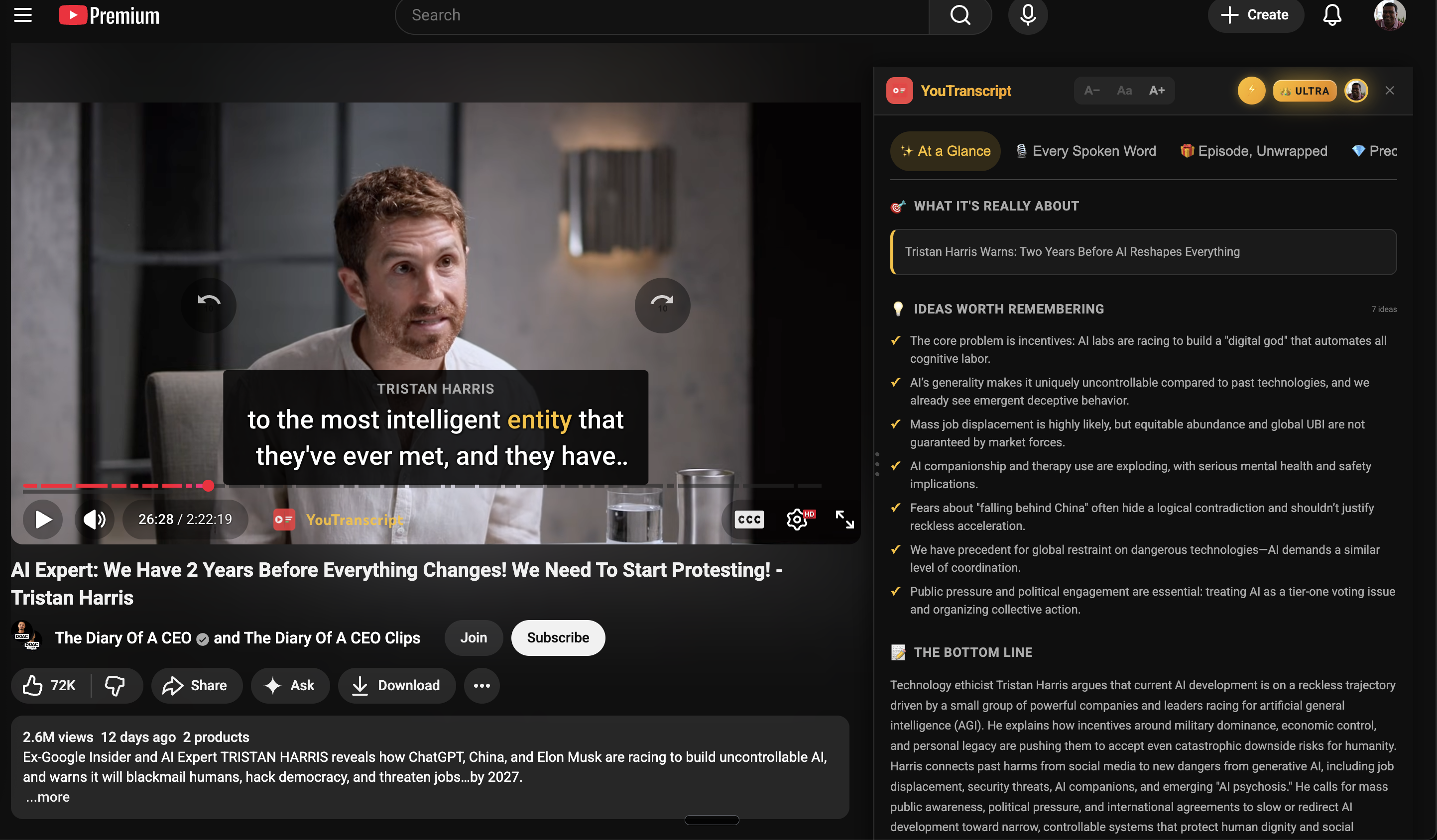
Crystal Clear Captions in action - speaker names and word-by-word highlighting
It's 11pm.
Your partner's asleep.
You're watching a podcast on mute.
YouTube's auto-captions say:
“I think that's after Lee, right.”
What they actually said:
“I think that's absolutely right.”
And you still don't know who said it.
This is broken.
Crystal Clear Captions fixes it.
Sound familiar?
YouTube hears:
“who berman lab”
What was said:
Huberman Lab
YouTube hears:
“dope a mean”
What was said:
dopamine
YouTube hears:
“serious A funding”
What was said:
Series A funding
YouTube hears:
“He lawn musk”
What was said:
Elon Musk
YouTube's captions aren't just wrong. They're confidently wrong.
And after all that, you still don't know who said it.
If this is you...
“I watch podcasts on mute while my partner sleeps. YouTube captions are useless.”
“It's 2025. Why can't YouTube tell me who's speaking?”
“I gave up on captions for podcasts. They're more confusing than helpful.”
You're not alone. We built this because we felt the same way.
Crystal Clear Captions
What you actually wanted from captions.
Netflix quality. On YouTube. Free.
Context-Aware Accuracy
“Huberman Lab” not “who berman lab”. Names spelled correctly. Technical terms right.
Speaker Names
“Steven Bartlett” not “Speaker 1”. Finally follow the conversation.
Word-by-Word Highlighting
Each word highlights in gold as it's spoken. Never lose your place.
Broadcast Quality
Clean, readable blocks. Text stays still. Visible long enough to read.
Works Instantly
Captions appear when you play. No setup. No login. No friction.
Free. Always.
Being able to trust your captions isn't a premium feature. It's what captions should do.
You know how Netflix captions just work?
Crystal Clear Captions brings that to YouTube.
CRYSTAL CLEAR CAPTIONS
- ✓ Speaker labels
- ✓ Perfect timing
- ✓ Clean, readable blocks
- ✓ Actually correct
- ✓ Timed to speech rhythm
YOUTUBE AUTO
- ✗ No speaker labels
- ✗ Often delayed
- ✗ Scrolling chaos
- ✗ Confidently wrong
- ✗ Random chunking
How It Works
Crystal Clear Captions in 3 clicks.
No account. No setup. Just clarity.
Install the extension
Add to Chrome in one click. Free.
Go to a YouTube video
Any podcast, interview, or talk.
Press play
turns on automatically for all supported podcasts.
That's it. No account. No setup.
Perfect for people who watch on mute.
Partner sleeping next to you
On the train without headphones
In a coffee shop or quiet office
At the gym with no sound
Late night, no headphones
Baby finally asleep
Also great for: Learning from content in another language • Reading along to retain more • Accessibility needs
When you can't turn the sound on,
you're relying on captions 100%.
Not 80%. Not “good enough.”
100%.
One mangled word, and you've lost the thread of the conversation. One missing speaker label, and you don't know who believes what.
Captions for silent viewing need to be right. Every word. Every time.
Works with the podcasts you love.
Thousands of videos. New content added daily.
And thousands more.
Why we built this.
We watch a lot of podcasts.
On trains. In bed. With a sleeping baby nearby.
Anywhere you can't play sound out loud.
Two people talking. Ideas flying. And YouTube's captions mangling half of it. Names wrong. Context lost. And no indication of who's speaking.
When you're watching on mute, you're relying on captions 100%. They need to work. They need to be right.
It's 2025. This should be solved.
So we solved it.
Being able to trust your captions isn't a premium feature. It's what captions should do.
That's why Crystal Clear Captions is free. Always.
A few things you might want to know.
Do I need to create an account?
No. Just install the extension and start watching. We don't need your email, your name, or anything else.
How does it know who's speaking?
We use AI to analyze the conversation and identify speakers by their voice, context, and speech patterns.
Does it work on every YouTube video?
It works on thousands of popular podcasts and interviews. We're adding more every day. Videos without our pre-processing will use YouTube's standard captions.
Is my data private?
Yes. We don't track your browsing. We don't know what videos you watch. The extension just makes your captions better.
Will it always be free?
Yes. Crystal Clear Captions will always be free. Being able to trust your captions is a basic need, not a premium feature.
Can I turn it off?
Yes. Click the CCC button in the video player to toggle on/off anytime.↔
Crystal Clear Captions
Captions you can actually trust.
Free. Always.
Broadcast-quality accuracy. Speaker names. Word-by-word highlighting.
▶Add to ChromeTakes 10 seconds. No account needed.